


TEXT SCRAMBLING in TRIAL VERSION OUTPUT! In evaluation mode, Help+Manual will scramble individual characters in random words in your published output files. This is a limitation of the free trial version. This help system was created with an evaluation copy of Help+Manual.
Once you have completed a couple of topics you will want to publish your output to see what your finished product is going to look like. You can output any of the formats supported by Help+Manual at any time – you don’t have to decide in advance what format you are building your project for. The only thing you may need to do before you begin is install the necessary Microsoft help compilers for HTML Help and Visual Studio Help (VS Help is only relevant for .NET program code documentation).
How to publish your project
|
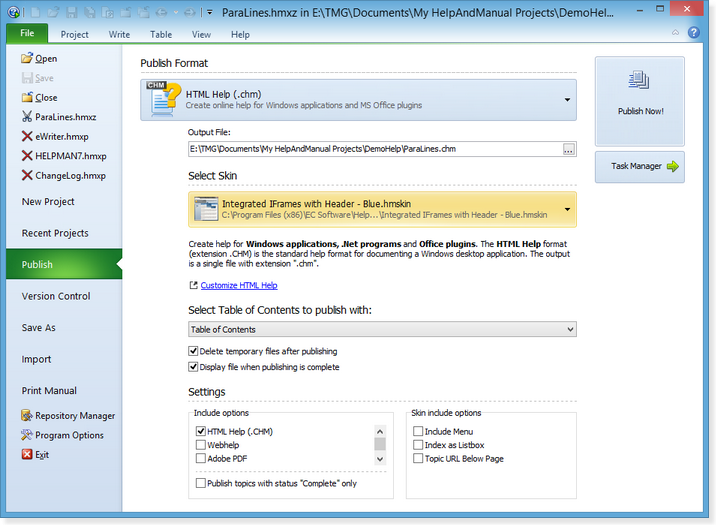
1.Save your project, then click on the File menu and select Publish. This displays the Publish interface: 2.Select the format you want to publish to from the Publish Format drop-down list. 3.Check the output file name and location in the Output File: field and change them if you want. 4.Make sure that the Display file when publishing is complete checkbox is selected, leave all other settings as they are. 5.Click on the Publish Now button. In a few moments you will be able to admire your finished product. Notes on individual output formats: MS HTML Help/CHM: WebHelp ePUB and Kindle Mobi eBooks EWriter eBooks Adobe PDF |

Installing the Microsoft help compilers
|
Unless you have already done so you need to download and install the free Microsoft compiler for HTML Help CHM files if you are planning on using this format. You can find the correct version of this compiler on the EC Software website, here:
After installing the compilers go to View > Program Options > Compilers and make sure that Help+Manual knows where to find them. The HTML Help compiler executable is called hhc.exe. |


