


TEXT SCRAMBLING in TRIAL VERSION OUTPUT! In evaluation mode, Help+Manual will scramble individual characters in random words in your published output files. This is a limitation of the free trial version. This help system was created with an evaluation copy of Help+Manual.
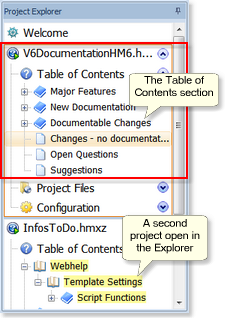
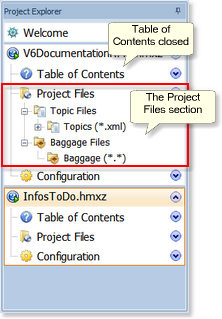
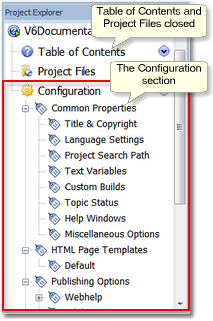
When you load a project its contents and settings are accessible in three main sections in the Project Explorer on the left: Table of Contents, Project Files and Configuration.
The Table of Contents or „TOC“ is a hierarchical tree of entries that define the structure of your project, organizing your topics into chapters and sub-chapters. Most TOC entries have direct links to topic files in the Project Files section.
The Project Files section provides access to the actual files that make up your project.
The Configuration section stores all the settings associated with your project.
|
Topic entries in the TOC are actually links pointing to matching topic files in the Topic Files section. |
 Key Information
The Table of Contents section
You can create new topic files by adding entries to the TOC. Doing this creates a TOC entry and a topic file, and links the entry to the topic file. You can also create topic files directly in the Topic Files section. Then the files do not have TOC entries. You can change the structure of your TOC by moving the entries around in the TOC tree, either with the mouse or with the blue arrow tools in Project > Manage Topics. Doing this just moves around the entries in the TOC – the topic files and other items to which the TOC entries link remain unchanged. |
The Project Files section
|
|
This section lists all the topic files in your project and „Baggage Files“, which are additional files associated with your project. The Topic Files subsection lists all your topic files, including those that do not have entries in the TOC. For example, these include popup topics and topics that are only displayed when the user clicks on a hyperlink. The Baggage Files subsection is the place where you store files that you want to export together with your project when you publish it. These can include graphics you want to use in your own HTML templates, JavaScript files containing functions you want to use in your HTML-based publishing formats and so on. If you are just getting started with Help+Manual you don’t need to worry about the Baggage Files section at the moment. |
The Configuration section
|
|
Project configuration settings #This section contains all your project’s configuration settings. This includes your project title, copyright notice, your language settings for help in international languages, special settings and editable layout templates for your output formats, „skins“ for changing the appearance and formatting of your entire project, user-defined variables and so on. Program configuration settings are in the File Menu! #Note that the Configuration section in the Project Explorer only contains settings for your individual projects (each project has its own configuration settings). The general configuration settings for Help+Manual are accessed in the File Menu! |
WordPress-Datenbank-Fehler: [You have an error in your SQL syntax; check the manual that corresponds to your MySQL server version for the right syntax to use near ')) AND p.post_type = 'docs' AND tt.taxonomy = 'doc_category' AND tt.term_id IN (' at line 1]SELECT p.ID FROM wp_posts AS p INNER JOIN wp_term_relationships AS tr ON p.ID = tr.object_id INNER JOIN wp_term_taxonomy AS tt ON tr.term_taxonomy_id = tt.term_taxonomy_id WHERE p.ID = '2101' AND p.ID < 2095)) AND p.post_type = 'docs' AND tt.taxonomy = 'doc_category' AND tt.term_id IN (29) AND p.ID NOT IN ( SELECT tr.object_id FROM wp_term_relationships tr LEFT JOIN wp_term_taxonomy tt ON (tr.term_taxonomy_id = tt.term_taxonomy_id) WHERE tt.term_id IN (0) ) AND p.post_status = 'publish' ORDER BY p.post_date DESC, p.ID DESC LIMIT 1
WordPress-Datenbank-Fehler: [You have an error in your SQL syntax; check the manual that corresponds to your MySQL server version for the right syntax to use near ')) AND p.post_type = 'docs' AND tt.taxonomy = 'doc_category' AND tt.term_id IN (' at line 1]SELECT p.ID FROM wp_posts AS p INNER JOIN wp_term_relationships AS tr ON p.ID = tr.object_id INNER JOIN wp_term_taxonomy AS tt ON tr.term_taxonomy_id = tt.term_taxonomy_id WHERE p.ID = '0' AND p.ID > 2095)) AND p.post_type = 'docs' AND tt.taxonomy = 'doc_category' AND tt.term_id IN (29) AND p.ID NOT IN ( SELECT tr.object_id FROM wp_term_relationships tr LEFT JOIN wp_term_taxonomy tt ON (tr.term_taxonomy_id = tt.term_taxonomy_id) WHERE tt.term_id IN (0) ) AND p.post_status = 'publish' ORDER BY p.post_date ASC, p.ID ASC LIMIT 1


