TEXT SCRAMBLING in TRIAL VERSION OUTPUT! In evaluation mode, Help+Manual will scramble individual characters in random words in your published output files. This is a limitation of the free trial version. This help system was created with an evaluation copy of Help+Manual.
If you are familiar with Windows Explorer and a word processor like MS Word then you already have the basic skills you need to find your way around the Project Explorer. It functions like a combination of Windows Explorer and Word.

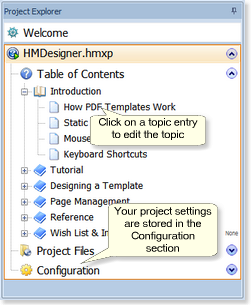
The Project Explorer displays the contents of your projects in the same way as files in the Windows Explorer file manager. Selecting topic files in the Table of Contents (TOC) or Topic Files sections displays their contents in the Editor, which works like a word procesor.
The Project Explorer display is exactly the same for projects using both the compressed .hmxz format and the uncompressed .hmxp format. The only difference between the two formats is the way they are saved – both contain exactly the same files and folders. The compressed format just has its folders and files inside a single file, which works like a ZIP archive.
Loading projects in the Project Explorer
Opening projects: #
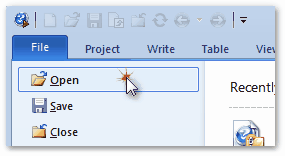
·To load an existing project select the File menu, click on Open. and select a project to load (or create a new project). Loading multiple projects: #
·You can load multiple projects in the Project Explorer. ·To load multiple projects at the same time, use Ctrl+Click and Shift+Click in the Open dialog. ·Select entries in the Table of Contents section to display and edit topics. |
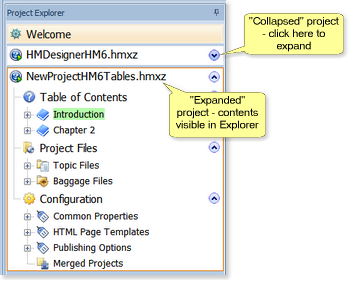
Expanding and collapsing projects and sections
|
·The ·Inside the main sections the +/- nodes expand and collapse the subsections, just as they do in the Windows Explorer. |
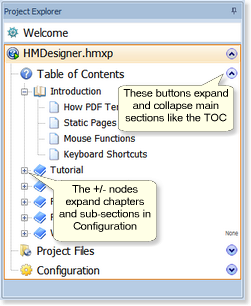
 and
and 
Editing in the Project Explorer
|
·To edit a topic or topic file just click on an item in the Table of Contents or Project Files sections of the Explorer. Topic contents are displayed in the editor and can be edited directly. Work as you would in a word processor. ·To edit your project properties just select items in the Configuration section – the dialogs with the settings are displayed in the editor pane. |
Dragging, copying and pasting in the Project Explorer
|
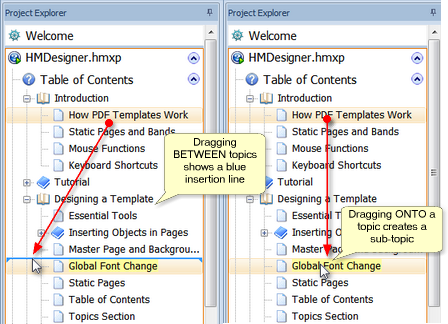
You can move, copy and paste topics in the Explorer. Drag with the mouse, right-click to display editing options or use the Clipboard functions in the Project tab. ·Drag a topic between other topics to insert it before or after the other topics. ·Drag a topic onto another topic to make it a child (subtopic) of the other topic. ·Use Ctrl+C to copy, Ctrl+X to cut and Ctrl+V to paste topics in the Project Explorer. |