Importing data

Table Of Contents

TEXT SCRAMBLING in TRIAL VERSION OUTPUT! In evaluation mode, Help+Manual will scramble individual characters in random words in your published output files. This is a limitation of the free trial version. This help system was created with an evaluation copy of Help+Manual.


You can import existing documentation into your Help+Manual projects from a wide variety of different formats. When you import data you can either create a new project or import the data into an existing project. The procedure in both cases is almost identical.

When you import data an interactive wizard guides you through each step of the process. However, each data format needs to be handled a little differently. You will find important information on each format further below.

Importing data to new projects

mn_appqat

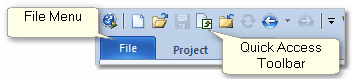
1.Select the File menu.

2.Select the documentation format under the Import existing documentation heading, then follow the instructions displayed.

Importing data into existing projects

1.Click anywhere in the Table of Contents section in the Project Explorer. The data will be inserted at the end of the current Table of Contents. You can move imported chapters and topics after importing if necessary.

mn_appqat

2.Select the File menu and click on Import.

3.Select the documentation format, then follow the instructions displayed in the interactive wizard.

WordPress-Datenbank-Fehler: [You have an error in your SQL syntax; check the manual that corresponds to your MySQL server version for the right syntax to use near ')) AND p.post_type = 'docs' AND tt.taxonomy = 'doc_category' AND tt.term_id IN (' at line 1]
SELECT p.ID FROM wp_posts AS p INNER JOIN wp_term_relationships AS tr ON p.ID = tr.object_id INNER JOIN wp_term_taxonomy AS tt ON tr.term_taxonomy_id = tt.term_taxonomy_id WHERE p.ID = '2126' AND p.ID < 2104)) AND p.post_type = 'docs' AND tt.taxonomy = 'doc_category' AND tt.term_id IN (28) AND p.ID NOT IN ( SELECT tr.object_id FROM wp_term_relationships tr LEFT JOIN wp_term_taxonomy tt ON (tr.term_taxonomy_id = tt.term_taxonomy_id) WHERE tt.term_id IN (0) ) AND p.post_status = 'publish' ORDER BY p.post_date DESC, p.ID DESC LIMIT 1

WordPress-Datenbank-Fehler: [You have an error in your SQL syntax; check the manual that corresponds to your MySQL server version for the right syntax to use near ')) AND p.post_type = 'docs' AND tt.taxonomy = 'doc_category' AND tt.term_id IN (' at line 1]
SELECT p.ID FROM wp_posts AS p INNER JOIN wp_term_relationships AS tr ON p.ID = tr.object_id INNER JOIN wp_term_taxonomy AS tt ON tr.term_taxonomy_id = tt.term_taxonomy_id WHERE p.ID = '2103' AND p.ID > 2104)) AND p.post_type = 'docs' AND tt.taxonomy = 'doc_category' AND tt.term_id IN (28) AND p.ID NOT IN ( SELECT tr.object_id FROM wp_term_relationships tr LEFT JOIN wp_term_taxonomy tt ON (tr.term_taxonomy_id = tt.term_taxonomy_id) WHERE tt.term_id IN (0) ) AND p.post_status = 'publish' ORDER BY p.post_date ASC, p.ID ASC LIMIT 1

What are your feelings

Updated on 20. November 2025